

What are the Waterworks Districts?
The Waterworks Districts oversee water service installation for properties in our five District areas and two water systems. This includes new service for individual properties and subdivisions that have never had water service before.
Waterworks District Offices
Do you have questions? Need help with your project?
Apply for Permit and/or Plan Check Online Using EPIC-LA
What is EPIC-LA?
EPIC-LA is Los Angeles County’s online system for managing permits and inspections. It helps residents, businesses, and developers oversee their building projects from start to finish. Whether you’re constructing a home, upgrading your property, or planning a large project, EPIC-LA provides a centralized platform to handle all permitting needs. Take a look at the major features of EPIC-LA below.
Application
Use EPIC-LA to submit the application for your permit and inspection online

Application
Apply online for all your permitting and inspection needs

Document Upload
Submit electronic copies of all your plans and supporting documentation

Fee Payment
Pay all permit and inspection fees electronically
Status
Use EPIC-LA to track and manage the progress of your application

Status Updates
Receive comments and notifications electronically

Contacts
Gives others access to real-time feedback, comments and notifications.

Collaboration
Allow collaboration between the Department, applicants, and design teams
Step 1: Find the Right Office
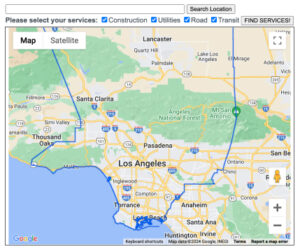
- Go to the Service Locator.
- Enter your street address or parcel number (numbers only, no dashes).
- Click on ‘Find Services’ to identify which water purveyor will issue water plan approval.
- If property is serviced by a LA County Waterworks Districts, respective LACWD office location/contact info will be shown.
- LACWD will be responsible for issuing water plan approval.
Step 2: Contact the Fire Department
Contact the local Fire Department for your district to confirm the fire flow requirements for your project.
Step 3: Prepare for Your Application
- Review and complete the following to avoid delays:
- Gather proof of ownership or proof of identity for your application.
- Submit all required documents (refer to the Necessary Forms for Water Service).
Step 4: Submit Application in EPIC-LA
- Log into EPIC-LA after receiving approved fire flow requirements for the project and submit the necessary forms based on your project type (residential, commercial, or subdivision).
- Apply for services such as:
- Water System Plan Reviews for water mains, fire hydrants, back flow prevention devices and more.
- Other Applications like Will Serve/Will Not Serve Letters, Fire Flow Availability, permanent meter and Water Availability Letters.
Step 5: Waterworks Reviews Your Application
- Upon receipt of a complete application package, Waterworks will perform a preliminary hydraulic analysis.
- Set service requirements and issue an Agreement Statement and Engineering Invoice for any needed system improvements. Requirements may also include annexation, right-of-way and/or participation in system improvements.
Step 6: Pay Fees and Sign Agreement
- Pay engineering review fees and sign the agreement to begin the review process.
- Work with the Waterworks District to finalize approved plans.
- Hire a licensed Civil Engineer or Surveyor to prepare water plans and easement documents, if needed.
- Identify any necessary water system improvements (like installing new fire hydrant, backflow device or any other water related infrastructure.
- Verify if the water plans involve extending a water main and/or adding off-site system improvements.
- Confirm the project site is within the Waterworks District. If it is not, contact the Local Agency Formation Commission (LAFCO) for annexation into the Waterworks District.
- Check if easements are needed for water facilities on private property (like backflow devices). If easements are needed, verify if any non-interference letters are needed and include this with your easement document submission.
- Ensure requirement and/or approval from the local Planning Department for enclosures around backflow devices.
- Confirm if a Division of Drinking Water (DDW) waiver is needed for clearance between utilities.
- Effectively respond to comments and expedite resubmittals.
Step 7: Receive Plan Approval and Pay Remaining Fees
- Contact the field office for remaining documents and fees (Inspection and Water Service Invoice).
- Pay connection fees to the wholesale water agency and provide the receipt to Waterworks.
- Pay all Waterworks District fees (such as Capital Improvement fees).
Step 8: Install the Water System Improvements
- Hire a licensed contractor (Class A, C-34, or SC-34) to:
- Install the approved water system improvements and meters per plans and specifications under District inspection.
- Coordinate with Waterworks for material submittal approval and obtain meter installation specifications.
- Ensure all permits are obtained and backflow devices are tested and certified by a qualified tester.
Step 9: Complete Final Steps
- Submit the completed inspection punch list and contractor’s as-built drawings to Waterworks for approval.
- Provide additional documents, including the Construction Cost Breakdown and Warranty Deed & Bill of Sale, to receive a Completion Letter.
- Once all steps are approved, Waterworks will turn on the new water service and set up billing accounts.